
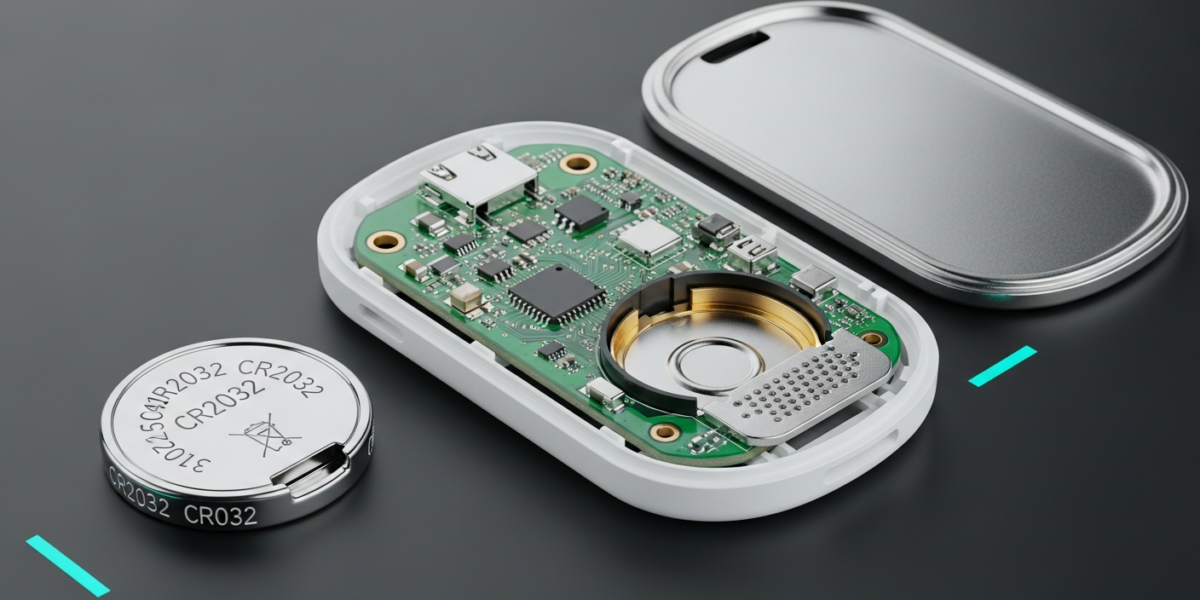
How to Replace an AirTag Battery in 30 Seconds
An AirTag uses a CR2032 coin cell battery. Replacement takes about 30 seconds with no tools: press the stainless steel back, rotate it counterclockwise, swap the battery, and twist the cover back on. The only common mistake is buying a coated CR2032, which the AirTag’s safety tab physically blocks.
What Battery Does an AirTag Use?
AirTags use a standard CR2032 lithium coin cell, the same size used in many key fobs, calculators, and medical devices. One critical detail: Apple’s AirTag includes a small anti-swallowing safety tab inside the battery compartment that blocks certain CR2032 batteries with a bitterant coating on the positive terminal.
Affected brands include some versions of Panasonic, Energizer, and Duracell CR2032s sold in specific markets. If the AirTag refuses to power on after a swap, the coating is almost certainly the problem. The fix: buy uncoated CR2032 cells. Brands confirmed to work without issues include Duracell 2032 (standard retail packaging in the US), Sony CR2032, and Renata CR2032. Apple sells compatible CR2032 batteries directly, and the ones bundled with the AirTag at purchase are always compatible.
How to Replace the Battery: Step-by-Step
- Get the right battery first. Confirm it is a CR2032 with no bitterant coating if you are unsure. Most uncoated ones are labeled simply “CR2032” with no special safety messaging on the front.
- Hold the AirTag face-down in your palm with the shiny stainless steel side facing up and the Apple logo side facing your hand.
- Press down firmly on the steel back and rotate it counterclockwise. You need to apply real pressure here. Rotate until you feel it stop, about a quarter turn.
- Lift the steel cover off. The old CR2032 battery will be visible sitting in the compartment.
- Pop out the old battery. It sits flat in the compartment with the positive side (the flat labeled side) facing up. Tip it out with a fingernail.
- Drop the new CR2032 in with the positive side facing up. You will hear a faint chirp from the AirTag confirming it recognized the new power source.
- Align the three tabs on the steel cover with the three slots on the AirTag body.
- Press down and rotate clockwise until it locks. When it is seated correctly you will feel it click into place.
If you do not hear a chirp in step 6, the battery may be seated wrong (positive side down) or coated. Remove it, flip it over or try a different brand, and repeat.
When Will Your AirTag Tell You the Battery Is Low?
AirTags are designed to run on a single CR2032 for about one year under typical use. Apple sends a low-battery notification to your iPhone through the Find My app when the battery drops to a level where you have roughly two to four weeks left. You can also check battery status at any time:
- Open the Find My app on your iPhone or iPad.
- Tap Items at the bottom.
- Tap the AirTag’s name.
- Battery level appears as a small icon below the item name. It shows Full, approximately half, or a Low warning.
The Find My app does not show a precise percentage, just a general indicator. Once you see the Low Battery notification, plan to replace within a few days to avoid gaps in tracking.
How Long Does a CR2032 Last in an AirTag?
Apple rates AirTag battery life at one year, based on the default use pattern of four sound events per day and no Precision Finding sessions. Real-world longevity depends on how often you locate the tag:
| Use pattern | Estimated battery life |
|---|---|
| Light (keys/bag, rarely located) | 12 to 14 months |
| Normal (occasional location checks) | 10 to 12 months |
| Heavy (daily Precision Finding, frequent alerts) | 6 to 9 months |
Precision Finding, where your iPhone uses the U1 chip to guide you directly to the tag with haptics and arrows, draws significantly more power than a simple location ping. If you use it daily, expect to replace the battery closer to the six-month mark.
For context on how coin cell chemistry compares to larger battery types, our AGM battery explainer covers the broader lead-acid and lithium landscape, and the guide to LiFePO4 lithium batteries is useful if you are also managing solar or home backup storage.
AirTag Battery Is New But It Is Not Working
Three things cause a fresh battery to not work:
- Coated battery. The bitterant coating on certain CR2032s is the most common culprit. Try a different brand.
- Cover not fully seated. The battery contacts require the steel back to be fully locked. If it feels slightly loose or the chirp never played, open it, reseat the battery, and close the cover more firmly.
- Corroded contacts. If the old battery leaked (rare with CR2032 chemistry but possible), a small amount of residue on the contacts can prevent a connection. Use a dry cotton swab to clean the contact points gently.
If your AirTag still does not chirp after swapping batteries and the issue is not any of the above, a hardware failure is possible. AirTags carry a one-year limited warranty from Apple, which covers defects in materials and workmanship. The AirTag itself communicates over Bluetooth and uploads location data via your iPhone and home WiFi; if you are troubleshooting connectivity rather than battery issues, the dual-band router guide explains how 2.4 GHz and 5 GHz bands affect device range in your home.
Does a Battery Swap Reset the AirTag?
No. Removing and replacing the battery does not unpair the AirTag from your Apple ID or remove it from Find My. The pairing data is stored in the AirTag’s own memory, not the battery. It reconnects to your iPhone automatically once power is restored, usually within a minute of the battery being seated.
If you want to transfer an AirTag to someone else, you must manually remove it from your account first via the Find My app, regardless of battery status.
Frequently Asked Questions
Which CR2032 batteries are compatible with AirTag?
Any uncoated CR2032 works. Sony, Renata, and Duracell standard retail packs in the US are confirmed compatible. Avoid CR2032 cells that mention a bitterant or anti-swallow coating on the packaging, as the coating thickness blocks the AirTag’s safety tab from closing properly.
Can I replace an AirTag battery with a rechargeable CR2032?
Technically yes, but rechargeable CR2032 cells hold about 35 to 50 mAh versus 220 mAh for a standard primary cell. That means replacing every two to three months instead of annually. The voltage is compatible at 3.0V nominal, but the capacity difference makes rechargeable CR2032s impractical for AirTag use.
Will a CR2025 fit in an AirTag if I cannot find a CR2032?
The CR2025 is physically smaller (2.5 mm thick versus 3.2 mm for the CR2032) and has lower capacity. It may fit loosely in the compartment and might make contact, but Apple does not recommend it and battery life would be noticeably shorter. Use the correct CR2032.
My AirTag cover will not twist back on. What am I doing wrong?
The three tabs on the steel back must align with the three slots in the AirTag body before the cover will rotate. Rotate the cover so the tab markings on the metal back line up with the gaps in the white plastic body, then press and twist. If you feel grinding resistance, you are off-alignment. Back off, realign, and try again.

Dean Prust was a reporter for Nebula Electronics, before becoming the lead editor. Dean has over fifty bylines and has reported on countless stories concerning all things related to technology. Dean studied at Caltech.